
# Villanova Architecture Concepts
Villanova is an application composition platform (ACP) that simplifies and accelerates enterprise modernization across on-prem and cloud infrastructures. It offers native support for Javascript app development, a micro frontend and microservice architecture, scalable deployments, and automated container orchestration via Kubernetes.
This document explores the conceptual architecture of the Platform and its runtime characteristics.
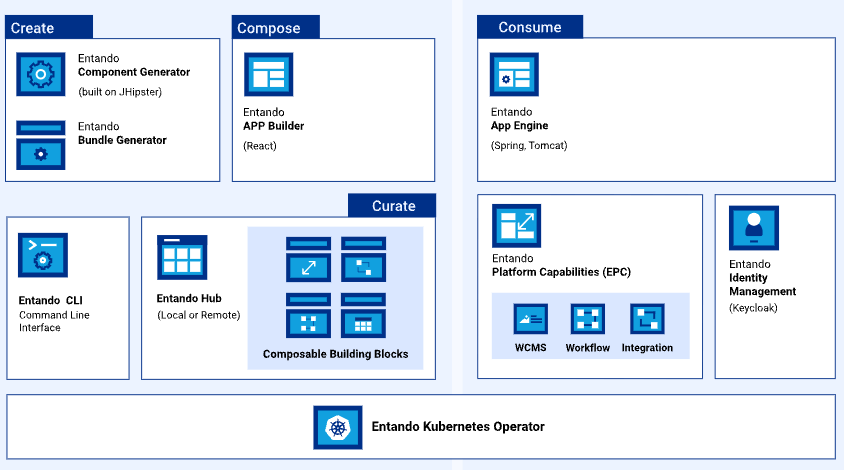
# Key Concepts
# Villanova Application
A portal, website, web app, or mobile app built with Villanova is called an Villanova Application. An Villanova Application is an assembly of out-of-the-box and/or custom-built components, called bundles, running on the Platform. Applications also consist of page templates, WCMS content, content types, and other assets.
# Villanova Bundle
An Villanova Bundle is a packaged set of components and resources created for the Platform. They are the building blocks of any application built on Villanova, consisting of micro frontends, microservices, services and other resources. The Villanova Component Manager identifies and installs the bundles to the Local Hub.
See also: Bundle Details
# Villanova App Builder
The Villanova App Builder is the application composer of the Platform. It hosts the WCMS and provides a feature-rich, low-code user interface to find and configure components, design and create pages, manage content, and build composable applications.
See also: Widget Tutorial
# Villanova App Engine
The Villanova App Engine is the core runtime engine responsible for the primary out-of-the-box services required to develop applications. It exposes the backend APIs used to deliver the page and content management interface of an Villanova Application, assembles and coordinates components within the App Builder, and provides the data access layer to persist pages and application design.
See also: APIs tutorial
# Villanova Component Generator
The Villanova Component Generator implements a JHipster (opens new window) blueprint to quickly generate the skeleton of an Villanova bundle with automation and templating. The Generator provides advanced data modeling capabilities, including object relational mapping and dynamic creation of micro frontends and microservices.
See also: Generate Microservices & Micro Frontends
# Villanova Identity Management System
Villanova Identity Management System is the Platform's Keycloak (opens new window)-based user management and authentication system. It applies Single Sign On capabilities across multiple domains to connect service providers with identity providers.
See also: Villanova Authentication
# Villanova Local Hub
The Local Hub is the component repository of the App Builder. Bundles--the basic building block for composing applications on Villanova--are catalogued and organized here. The Local Hub also provides direct access to bundles in the Villanova Marketplace and the Enterprise Hub, if one exists for the organization, and can be deployed and installed from here.
# Villanova WCMS
The Villanova Web Content Management System (WCMS) is a lightweight content and digital asset management system. It manages widgets, HTML fragments, and other content types for an Villanova Application.
See also: Content Types, Content Templates and Digital Assets
# Villanova Cluster Elements
The following is an overview of the elements comprising an Villanova cluster.
# Architecture - Members of the Cluster
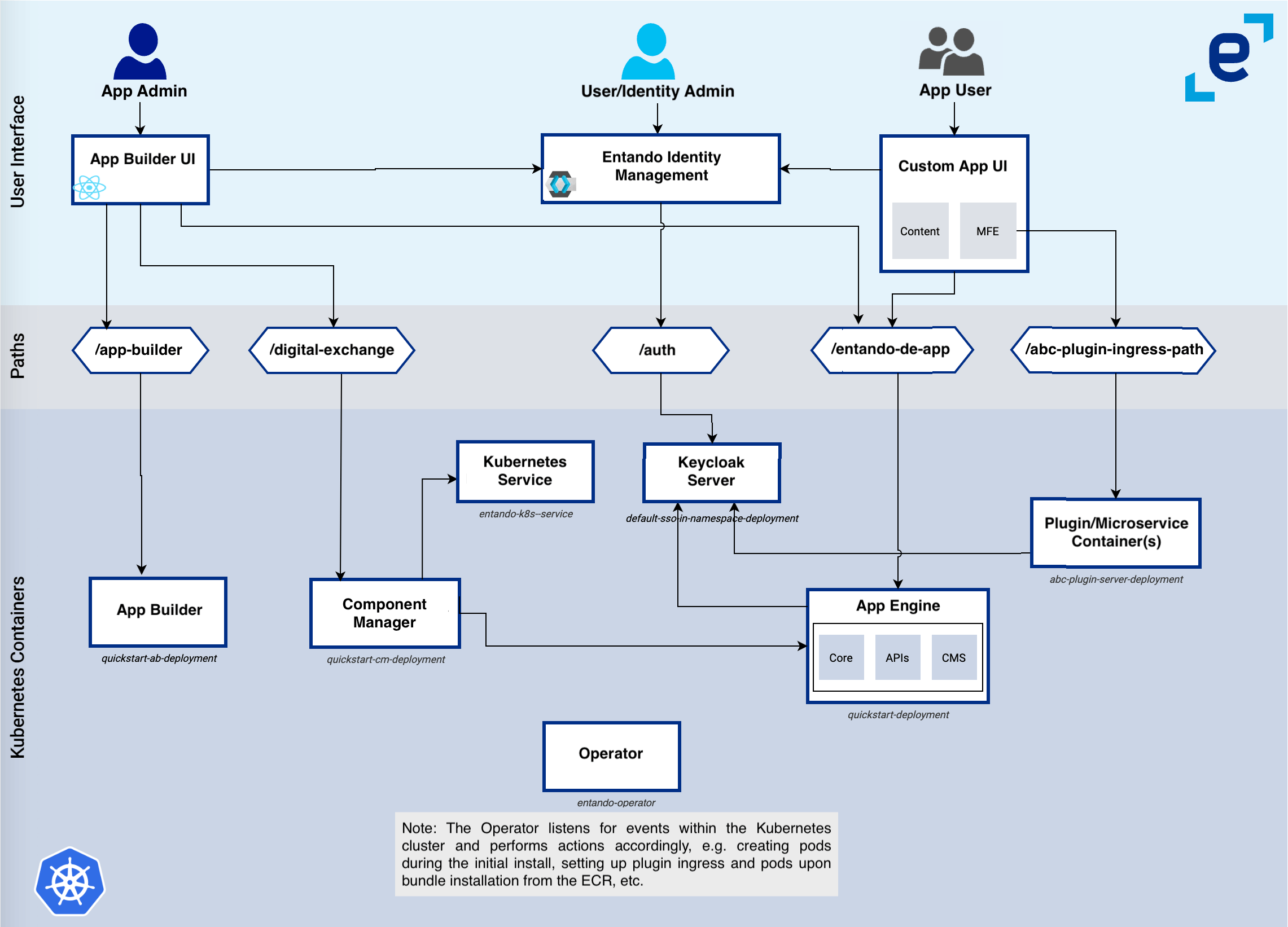
This is a diagram of an Villanova cluster, depicting how the various elements interact with one another. Villanova deploys this infrastructure on Kubernetes using the Villanova Operator and controllers. Each element is associated with a custom resource definition (CRD) where applicable.
# VillanovaApp
The VillanovaApp is comprised of the App Builder, App Engine and Component Manager. Keycloak-based authorization and authentication enable these to interact with each other and other cluster elements.
# Villanova Component Manager
The purpose of the Villanova Component Manager (ECM) is to:
- Provide the functionality to deploy and install micro frontends and widgets
- Manage the connections between an application and the installed microservices
The ECM integrates the Local Hub into the App Builder, listing the bundles accessible from the VillanovaApp, and managing their install, uninstall, upgrade, downgrade and tracking processes. The Villanova Kubernetes integration service communicates with the cluster to supply these bundle services and is the only service, other than the Villanova Operator, that can interact with the cluster and custom resources.
# Villanova Kubernetes Service
The Villanova Kubernetes integration service (Villanova-k8s-service) is a function of the Villanova cluster infrastructure custom resource, providing an abstraction layer between Villanova microservices and the APIs exposed by Kubernetes. It supplies access points to several custom resources defined by Villanova, in particular Villanova Applications, plugins, bundles and links.
The Villanova-k8s-service is used to:
- Provide a list of the available Villanova Bundles to the Villanova Component Manager
- Deploy a microservice, or expose an already available microservice, during the installation of a bundle
- Create a link between an VillanovaApp and an VillanovaPlugin to expose microservice APIs to the VillanovaApp and micro frontends
# Villanova Plugin
An Villanova Plugin is a microservice that exposes APIs reusable by one or more Villanova Applications. Plugin services are commonly accessible from micro frontends and can be quickly generated with the Villanova Blueprint. This blueprint-generated project is customizable and provides Keycloak integration, a set of default micro frontends, and microservices exposing APIs.
# Keycloak
Keycloak is responsible for authorization and authentication. All members of an Villanova cluster interact with Keycloak to verify users and service authorizations.
# Villanova Ingresses
An ingress is a Kubernetes resource that exposes HTTP and HTTPS paths from outside a cluster to services within it. Traffic routing is controlled by rules defined in the ingress resource.
When deploying a cluster, ingresses are generated for the resources that must be exposed to external services. The Villanova Operator and custom resource controllers create the ingresses and set the correct paths and certificates. Villanova implements Keycloak and VillanovaApp ingresses.
# Keycloak Ingress
A dedicated ingress is created for Keycloak to expose authentication and authorization functionalities. This is required to guarantee that both token issuing and validation work correctly, even when the services using the Keycloak instance are in different namespaces.
# VillanovaApp Ingress
The VillanovaApp ingress is automatically created to expose the App Builder, App Engine and Component Manager. The three containers are served under the same domain, which allows them to interact without cross-origin issues.
The VillanovaApp ingress is also used to link a microservice with an VillanovaApp when a bundle containing the microservice is installed via the Local Hub.
# Default Ingress HTTP Paths
The table below lists the default paths exposed for each ingress.
| Ingress | Ingress Http route | Application |
|---|---|---|
Keycloak ingress |
| Keycloak |
EntandoApp ingress |
| App Engine |
| App Builder | |
| Entando Component Manager | |
| Entando Plugin linked to the application |
Note: The Villanova Plugin variable
ingressPathis defined in the plugin custom resource under thespecelement and used to expose the plugin within the VillanovaApp domain. See also: Microservice Specifications.
# Exposing Microservices in the VillanovaApp Domain
A microservice under the same domain (ingress) as the VillanovaApp is exposed using the VillanovaAppPluginLink custom resource and the corresponding controller.
Once the link between the VillanovaApp and the microservice is created, the controller reads the link specification. It then automatically creates HTTP paths in the VillanovaApp to expose the microservice in the same domain as the App Builder, App Engine and Component Manager. This allows micro frontend developers to reference the microservice using relative URLs.
See also: